


Thermometer For Room Temp
4.1102.00 Reviews
App Specs
- Version
- 1.26.48
- Updated On
- License
- Free
- Downloads
- 500,000+
- Developer
- Micro Inc
- Categories
- Weather
- Platform
- Android
Screenshots
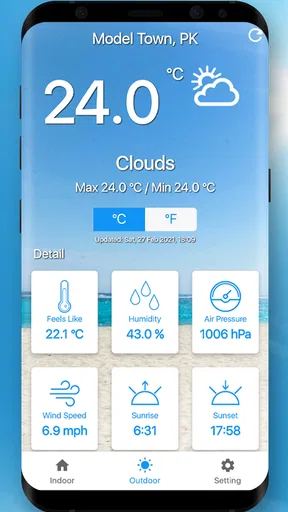
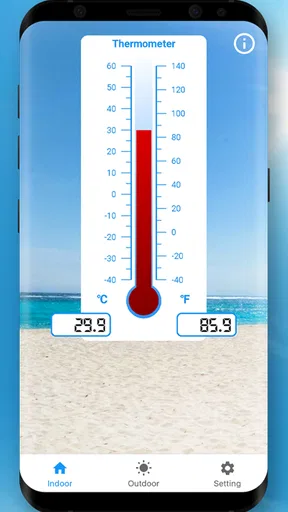
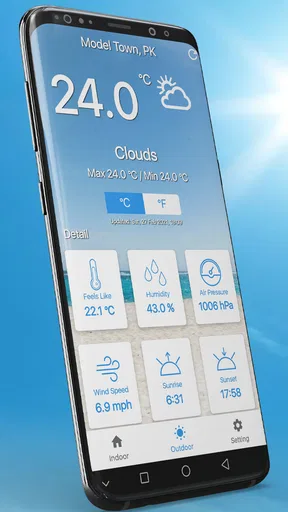
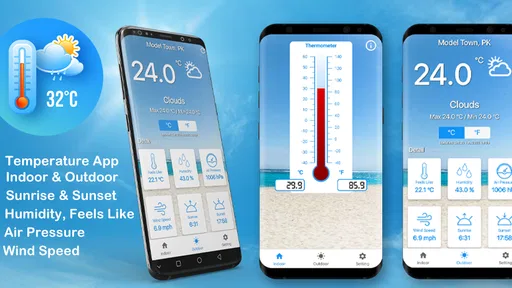
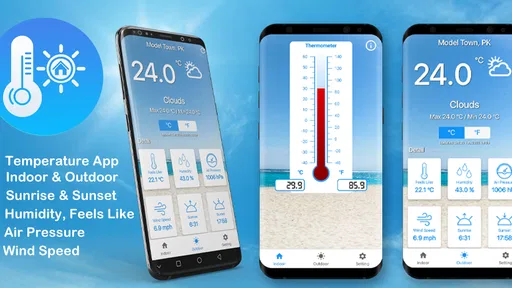
 Analysis by AppCompare
When I want a quick sense of whether a room feels unusually warm or cold, I can see the appeal of checking my phone before buying another gadget. Thermometer For Room Temp is a free weather app from Micro Inc, and its straightforward purpose makes it easy to understand: it aims to give you an indoor temperature reading without asking you to learn a complicated interface. I would treat it as a convenient first check, though, rather than a replacement for a proper thermometer.
What to expect from a phone-based reading
The key question is whether a phone can measure the room around it. A handset’s internal temperature is affected by its own components, recent use and the place where it has been sitting. That means an app-based estimate is most useful as a rough indication, not as a dependable measurement for a situation where a precise temperature matters.
For a more useful check, I would let the phone rest away from direct sunlight, heating vents and other obvious sources of warmth before opening the app. I would also avoid judging a room immediately after a long gaming session or while the phone is charging. Those small habits do not turn a phone into a dedicated instrument, but they can help you avoid mistaking device heat for a change in the room.
Where it fits in a daily routine
I can imagine using it before settling down to work, when a room feels stuffy but I am not sure whether the heating is responsible. A quick reading can help me decide whether to open a window, adjust a thermostat or simply move away from a sunny spot. I would then check again after the room has had time to change, rather than expecting the number to react like an instant, calibrated sensor.
It can also be a handy first look when I am checking a bedroom or a small home office. If the reading seems surprising, I would compare it with how the space actually feels and, when the decision has consequences, use a dedicated room thermometer. That two-step approach is more sensible than treating a single phone reading as proof that a room is safe or comfortable.
Who will find it useful—and who should look elsewhere
This app makes the most sense for someone who wants a quick, informal indication and does not already have a room thermometer close at hand. Its simple purpose is appealing if you prefer checking a phone over searching for a separate device, and it may be enough to help you notice broad changes from one check to another.
I would choose a dedicated thermometer instead if I needed consistent accuracy, wanted to monitor a room for a specific health or storage need, or planned to make decisions based on narrow temperature differences. A phone app is also less useful if the handset itself is often warm or if you need reliable readings from several rooms. In those cases, the convenience does not outweigh the limitations of using a phone as the measuring device.
Worth Reading Before You Choose

EA SPORTS FC Mobile 26 Is a Bigger Football Game, but It Takes Time

Flipboard Shows What News Apps Must Do Beyond the Feed

Switching to Android Auto Means Rethinking Your Driving Routine

Google Calendar Makes a Crowded Week Easier to Manage

Ludo King Makes the Most of the Minutes Between Plans

Baby Panda World Brings Quick Play to Modern Phones, but Its Game Library Feels Busy
How it compares with ordinary weather tools
A standard weather app is designed to tell you about outdoor conditions and forecasts, while this one focuses on checking an indoor reading. Those are different jobs: an outdoor forecast can help you plan what to wear, but it cannot tell you whether your particular room is warmer than the rest of the house. For a rough indoor check, a dedicated thermometer is the more direct alternative; for broader weather planning, a conventional forecast app is the better fit.
That distinction is worth keeping in mind before installing it. I would not use an indoor thermometer app to plan a trip or interpret the forecast, and I would not expect a general weather app to measure the temperature beside my desk. The choice depends on whether I need a rough sense of one indoor space or information about conditions outside.
How I would judge a reading
Rather than focusing on one number, I would use the app in the same spot and under similar conditions when I want to compare changes. For example, checking before and after adjusting a room’s heating can be more informative than comparing readings taken in different rooms with a warm phone in one of them. This is a practical way to make an estimate more useful without pretending it is laboratory-grade measurement.
I would also pay attention to whether the reading makes sense alongside the room itself. If the number changes sharply while the room feels unchanged, I would repeat the check after letting the phone rest. If I were deciding whether a space is suitable for a sensitive task, I would confirm it with a standalone thermometer rather than relying on the app alone.
Thermometer For Room Temp is rated for Everyone, has a four-point-zero average from around three thousand two hundred ratings, and has passed half a million installs. Those figures suggest that people have found a use for a simple indoor check, but they do not make every phone reading equally reliable. I would weigh the app’s convenience against the fact that the handset’s hardware and conditions can affect the result.
It is free to install, with optional in-app purchases listed from one dollar and ninety-nine cents to twelve dollars and ninety-nine cents per item. I would start with the free experience and decide whether anything beyond that is worthwhile for my own use, rather than paying before I know how well the reading works on my phone. Its current version is 1.26.43, and it supports Android 6.0 and later.
The app was released on February 27, 2021. Knowing that history gives some context, but it does not by itself tell me what has changed from one version to another. I would judge the current release by how clearly it presents a reading and whether it remains useful on my device, rather than assuming that its age proves either steady improvement or neglect.
For someone who already uses the app, the most useful approach is to keep expectations consistent: treat it as a quick estimate, check under similar conditions, and reach for a dedicated device when accuracy matters. If a future version changes how readings are presented or improves compatibility, that could make the everyday check more convenient; I would still want to see whether the result is dependable in practice before changing how much I rely on it.
Getting Started with Thermometer For Room Temp
First things first, downloading Thermometer For Room Temp is a breeze. It's available on both Android and iOS, so you won't have any trouble finding it in your respective app store. Once installed, you're greeted with a simple and straightforward interface. No frills, just the basics—exactly what you'd want from an app designed to tell you the temperature.
The app uses your phone's built-in sensors to gauge the ambient temperature. Now, you might be thinking, "Does my phone even have such a sensor?" Well, most modern smartphones are equipped with basic sensors that can provide an estimate, and this app makes the most of that capability.
The User Experience
Using the app is as easy as pie. Just open it up, and within seconds, you get a reading of your room's temperature. The interface is clean with large, easy-to-read numbers, which makes it accessible for everyone. I found it super convenient, especially when I'm sitting at my desk and want to make sure my workspace is at a comfy temperature.
There's also a neat feature that displays the historical data of the temperatures recorded. So, if you're a bit of a data geek like me, you'll find it fascinating to see how the temperature fluctuates throughout the day. It's a small touch, but it adds a lot of value to the app.
Accuracy and Reliability
Now, let's talk about the elephant in the room: accuracy. While the app does a decent job of giving you a rough estimate, it's important to remember that it's not going to be as precise as a dedicated thermometer. The readings can be influenced by the phone's internal temperature and other environmental factors.
That said, for casual use, like making sure your room isn't turning into a sauna or an icebox, it's pretty reliable. I've found it to be within a few degrees of my actual room thermometer, which is good enough for me.
Design and Functionality
If you're a sucker for design, you'll appreciate the app's minimalistic aesthetic. It's all about functionality here, with no unnecessary bells and whistles to distract you. The color scheme is easy on the eyes, and navigating through the app is intuitive. It really embraces the "less is more" philosophy, which I personally love.
The app also doesn't bombard you with ads, which is a huge plus in my book. There's nothing more annoying than trying to check the temperature and being interrupted by pop-ups.
Final Thoughts
So, should you download Thermometer For Room Temp? If you're looking for a simple, no-nonsense way to get a quick temperature reading of your room, I’d say go for it. It's not perfect, but it gets the job done without any fuss. Plus, it's free, so there's really nothing to lose.
In a world full of complex apps, it's refreshing to find something that sticks to the basics and delivers on its promises. Give it a try and see if it fits your needs. You might just find it becomes one of those apps you didn't know you needed until you had it.
Pros
- Easy to use interface and design.
- Real-time temperature updates.
- Compatible with most devices.
- No external hardware needed.
- Accurate readings for indoor use.
Cons
- Limited to indoor temperature readings.
- Ads can be intrusive at times.
- Requires internet for some features.
- May not work on older devices.
- Occasional calibration issues.
FAQs for Thermometer For Room Temp
How accurate is the Thermometer For Room Temp app?
The Thermometer For Room Temp app uses your device's built-in sensors to estimate room temperature. While it can provide a general idea, its accuracy may vary due to external factors like device placement and sensor limitations. For precise readings, consider using a digital thermometer alongside the app.
Does the app require an internet connection to work?
No, the Thermometer For Room Temp app does not require an internet connection for its basic functionality. It relies on your device's sensors to measure temperature. However, some features like updates or additional settings might need internet access to function properly.
Can the Thermometer For Room Temp app measure outdoor temperature?
The app is primarily designed to measure indoor temperature using your device's sensors. For outdoor temperature, it would need to rely on online weather data, which may not always reflect your immediate surroundings accurately. It's best used for indoor environments where your device is located.
Is the app compatible with all devices?
The Thermometer For Room Temp app is compatible with most modern Android and iOS devices. However, older models or those lacking certain sensors may experience reduced functionality. Check the app's requirements on the download page to ensure compatibility with your specific device.
How can I improve the accuracy of the app's readings?
To improve accuracy, ensure your device is placed away from direct sunlight, heat sources, or drafts. Allow the device to acclimate to the room's environment for a few minutes. Regularly calibrating the app may also help refine its readings. Always cross-check with a standard thermometer for best results.


